In many of the TD-17's factory Kits, the Ambience effect is subtle and can be masked by the Instruments. For a close, accurate listening experience, we recommend connecting headphones directly to the PHONES output on the back of the TD-17 when testing.
As a quick test, select Factory Kit #13 "Jazz Funk," #14 "ClassicMetal," or #15 "60s Rock." Then, while tapping continuously on the snare pad, turn the Ambience knob all the way to the minimum position (counterclockwise), to all the way maximum (clockwise). You will then hear the Ambience level change.
***Note: Turning the AMBIENCE knob will not show the Ambience level value changing in the TD-17's display, which is normal.
Here are Steps for a more detailed test:
- Connect headphones to the TD-17's PHONES output.
- Turn the VOLUME knob clockwise to increase the level.
- Turn the AMBIENCE knob clockwise to the maximum position.
- Turn the main dial to choose a Kit to edit.
- Press the "OTHER" button.
- Press the function 1 (AMBIENCE) button - The AMBIENCE menu appears.
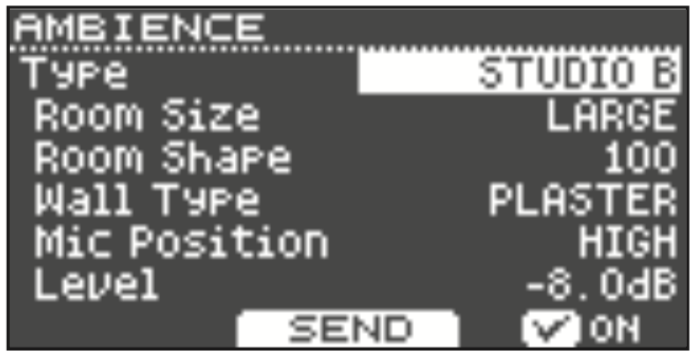
- Press the function 3 button to confirm a "check-mark"[ ☑️ ] is in the box next to "ON."
- Turn the main dial to choose "EXPO HALL" for the Ambience Type (top of the screen).
- Cursor down once to highlight the Room Size, and then turn the dial to choose "HUGE."
- Cursor down to highlight the value across from "Level," and then turn the dial clockwise to increase the level to "+6.0dB."
- Press function 2(SEND tab).
- Hit the snare pad to select it, then turn the dial clockwise to increase the SEND value to "+6.0dB."
Continue to play on the snare pad and monitor the sound. You should hear a prominent Ambience/Reverb effect trail from the snare. You can then press the function 3 button to turn the Ambience On/Off while hitting the snare pad to compare.
Press the DRUM KIT button when you're finished.