The Aerophone AE-20/AE-20W supports transmit channel changes only. The receive channel is fixed.
Changing the transmit channel
The Aerophone Pro Editor app (iOS/Android) is required to change the TX channel.
- Turn the [MIDI CONTROL] switch on.
- Connect the Aerophone AE-20/AE-20W to the app via Bluetooth.
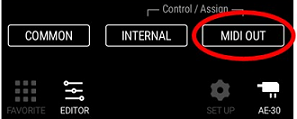
For details on how to connect, please refer to “Preparing to Use Aerophone Pro Editor” in the Aerophone Pro Editor Owner’s Manual. - Tap the [EDITOR] at the bottom of the app screen.
- Tap [MIDI OUT].
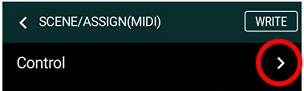
- Tap the right arrow next to "Control".
- Tap the TX Channel value and change the transmit channel. Setting range: 1 to 16.
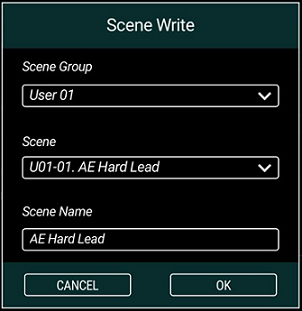
- Tap [WRITE].
The Scene Write screen appears. - Set the Scene Group, Scene, and Scene Name, then tap [OK].
The edited settings are transmitted to your instrument.


The receive channel cannot be changed
MIDI channels for tones (except drum kit tones):
- Part 1: ch. 1
- Part 2: ch. 2
- Part 3: ch. 3
- Part 4: ch. 4
MIDI channel for drum kit tones (note that if a drum kit tone is set for Part 1, Parts 2–4 cannot be used):
- Part 1: ch. 5