It's important to set the proper Pad Type for an external pad that you have connected to the HPD-20's trigger input. Doing so sets up the input and optimizes the trigger response and accuracy for the pad/trigger. Here's how to set the Pad Type in the HPD-20:
- Connect the external pad to the TRIG IN jack on the HPD-20's back panel.
- Turn on the HPD-20.
- Press the MENU button.
- Use the cursor buttons to highlight "SYS," and then press ENTER.
- Cursor up or down to highlight "ExtTrig Settings," and then press ENTER.
- Press the function 1 button (below the display) to select the "TYPE" tab.
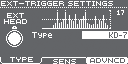
- Hit the external pad to select it.
- Press the [+] or [-] button to choose the Pad Type. For example, if you have a KD-7 kick pad connected, choose "KD-7."
- Press the KIT button when you're finished. The new setting is saved automatically.